CueForge Open the app

00:00:00,000 · for subtitlers, captioners & localizers

The last check before your subtitles ship.

Reading speed, timing, line length, gaps and Arabic shaping, flagged against verified Netflix presets and editable baselines, then exported — on Pro — as a report you can hand a client. It runs in your browser; nothing uploads.

00:01:12,400 00:01:15,900

«مرحبًا بكم»

- and welcome back.

ASS → TTML ✓ style preserved
RTL + colour + italics, losslessly.

Your subtitle files never leave your device.

Every parse, conversion, QC pass and re-sync runs locally in your browser, including auto-resync, which decodes your audio on-device. Perfect for embargoed episodes, NDAs, and confidential cuts. To be precise: a Pro licence check and cookieless page-view analytics are the only network calls, and they never see your content.

Loss Matrix

See exactly what survives, before you deliver.

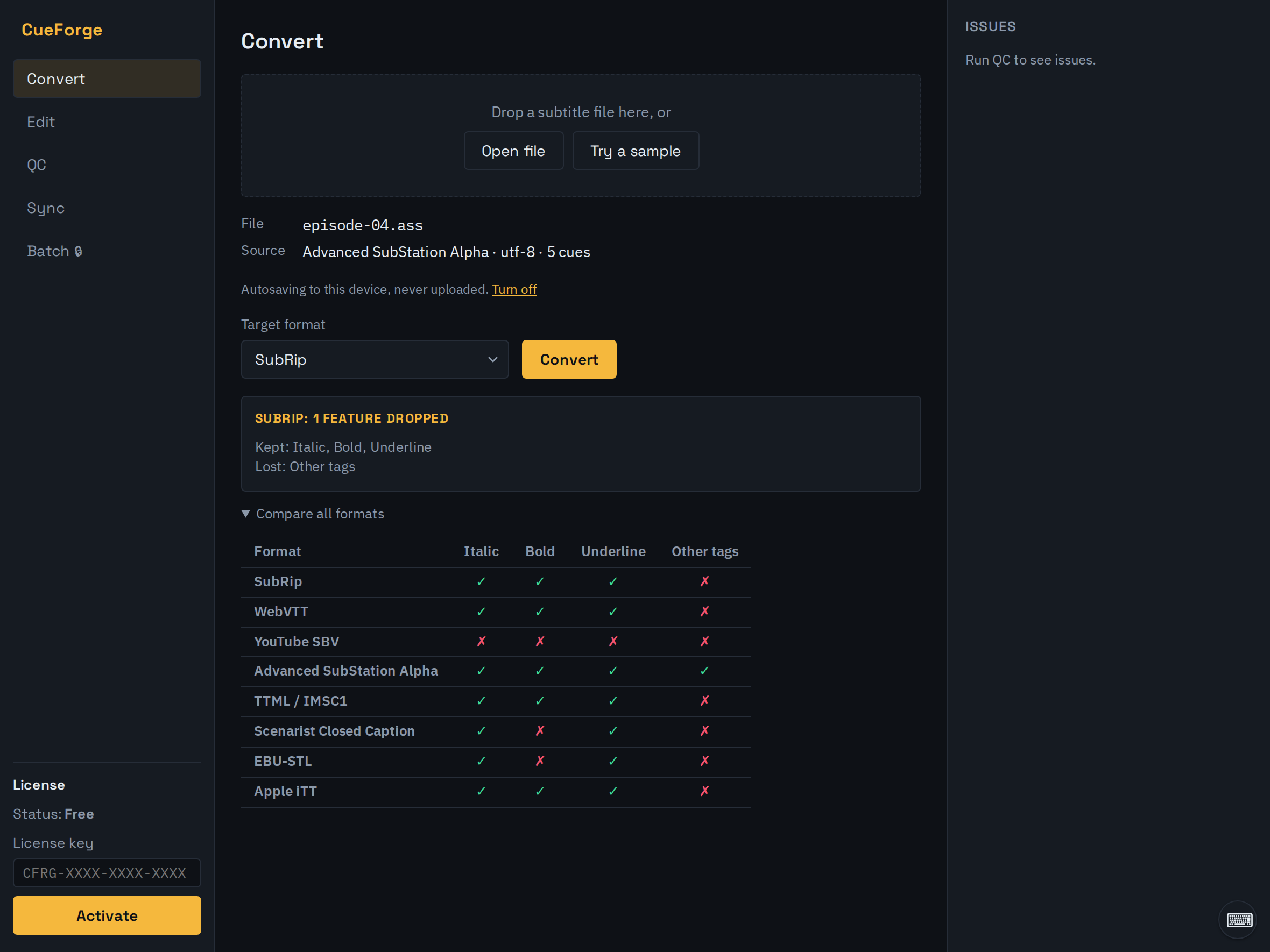
The live loss matrix compares every target format against your file, so colour, italics, positioning and line breaks never drop by surprise. It's the real app, running entirely in your browser.

CueForge converting a styled ASS subtitle: the loss matrix shows which formatting each target format keeps or drops.
Features

Built for the work that pays.

Compliance QC, with a report

Reading speed, durations, gaps, overlaps and line length, checked against verified Netflix presets or a baseline you tune — every QC pass runs free. Auto-fix the safe ones, then export a CSV or printable report to sign off a delivery Pro.

Arabic & RTL, bulletproof

Right-to-left text, bidi and shaping handled correctly end-to-end, with QC rules written for Arabic, not bolted on.

Style-preserving conversion

Colour, positioning, italics and line breaks survive the round-trip, with a live loss matrix that shows exactly what each target keeps before you convert.

Broadcast & OTT formats Pro

SCC (CEA-608), EBU-STL, TTML/IMSC, Apple iTT, MacCaption MCC (CEA-708) and EBU-TT-D, imported and exported with styling and timing intact. Validate the export against your platform's spec before delivery.

Sync that holds

Shift and linear retime, free. Frame-rate conversion, drift correction and audio auto-resync for when an ASR transcript drifts against the cut Pro.

A real timeline, not just a grid. Pro

Load your video, see the waveform, drag cues against the audio, step frame by frame — retimes happen against the picture, not just the numbers.

Draft subtitles from the audio itself Pro

Point CueForge at a video or audio file and it writes timed, word-aligned cues that land straight in the cue table for a QC pass. The whole thing runs in your browser, so nothing uploads — the same reason it works on locked-down machines and audio under NDA. One language per file, detected from the audio. The first run downloads the speech model once (about 250MB), then reuses it.

Start from a blank document

No source file to hand? Open an empty subtitle and build it by hand. Add the first cue, then insert or delete rows as you go, editing timing and text right in the table. Free.

Style a cue by hand

Italic, bold, underline and colour, applied straight from the cue table — aware of what your source format can actually carry. Free.

Batch, off the main thread Pro

Convert, retime and QC a whole folder at once in a Web Worker — SRT through binary EBU-STL, plus SCC, TTML, iTT, MCC and EBU-TT-D — then download the results as a ZIP. Your UI never freezes.

Presets

Check against the spec your deliverable answers to.

Verified presets carry thresholds cited to the platform's published spec; baseline presets are sensible defaults, not a platform standard. Every limit is editable in the app, and the QC report names the preset it ran. Read the Netflix subtitle requirements guide for where these numbers come from. Delivering under the EAA, ADA or FCC? Those regulations don't publish numeric thresholds — see the EAA, ADA and FCC guides for what they actually require.

Clone any of these as a starting point, or build one from scratch, then import preset files your team shares Pro. Presets save locally, and exporting your own to a file is free.

Formats

The formats you deliver in, both directions.

Free

  • SRT
  • WebVTT
  • SBV
  • ASS / SSA

Pro broadcast

  • SCC
  • EBU-STL
  • TTML / IMSC
  • Apple iTT
  • MCC (CEA-708)
  • EBU-TT-D
Pricing

One plan. No per-seat games.

Free

$0

  • SRT · VTT · SBV · ASS, both ways
  • Full style + loss matrix
  • QC checks, repair, shift & retime
  • 100% local, no account needed
Open the studio

Pro

$99 / year, or $12 / month

  • Everything in Free, plus:
  • QC compliance report (CSV / printable)
  • SCC · STL · TTML · iTT · MCC · EBU-TT-D import & export
  • Frame-rate, drift & audio auto-resync
  • Custom QC presets — clone, build & import
  • On-device transcription of audio & video → draft cues
  • Batch convert, retime & QC, broadcast sources included → ZIP
Start 7-day free trial Subscribe monthly · $12/mo

The 7-day free trial bills annually at $99/year afterwards; monthly billing is $12/month. A licence key, activated locally. Cancel anytime.

Already have a license key? Activate it in the app.

Open it. Drop a file. Watch nothing upload.

Open CueForge